The best Chrome new tab extensions in 2026
Your new tab is the page you open most in your whole browser. Here are six extensions that replace the blank default with something better, with honest notes on what each one is actually good at.
By Yash Kapoor··9 min read
The default Chrome new tab is a search box and a few shortcuts you probably ignore. A good new tab extension turns that wasted moment into something useful: your bookmarks, your tasks, a calm background, or all three. The trouble is most "best new tab" lists are just affiliate roundups. This one is not. We make one of the tools below (Tabisto), and we have tried to be straight about where it wins and where another pick is the better call.
One disclosure up front: Tabisto is first on this list because it is what we build and know best, not because it beats every tool at everything. Read the comparison table near the end for the short version.
What actually makes a new tab extension worth keeping
Most people install a flashy new tab, enjoy it for a few days, and quietly remove it. The ones that survive share a few traits:
- Useful every open, not just pretty once. A wallpaper is nice on day one. Bookmarks, search, and notes earn their place every single tab.
- Instant load. You open the new tab dozens of times a day. Anything that fetches a remote photo or runs heavy scripts on every open will annoy you into uninstalling it.
- A real free tier. Many new tab extensions paywall the basics. Check what you get free before you commit your most-opened page.
- Privacy. A new tab extension can see how often you open tabs. Local-first tools that do not track your links are the safer default.
With that frame, here are the six worth your time.
1. Tabisto: best for organizing bookmarks on every tab
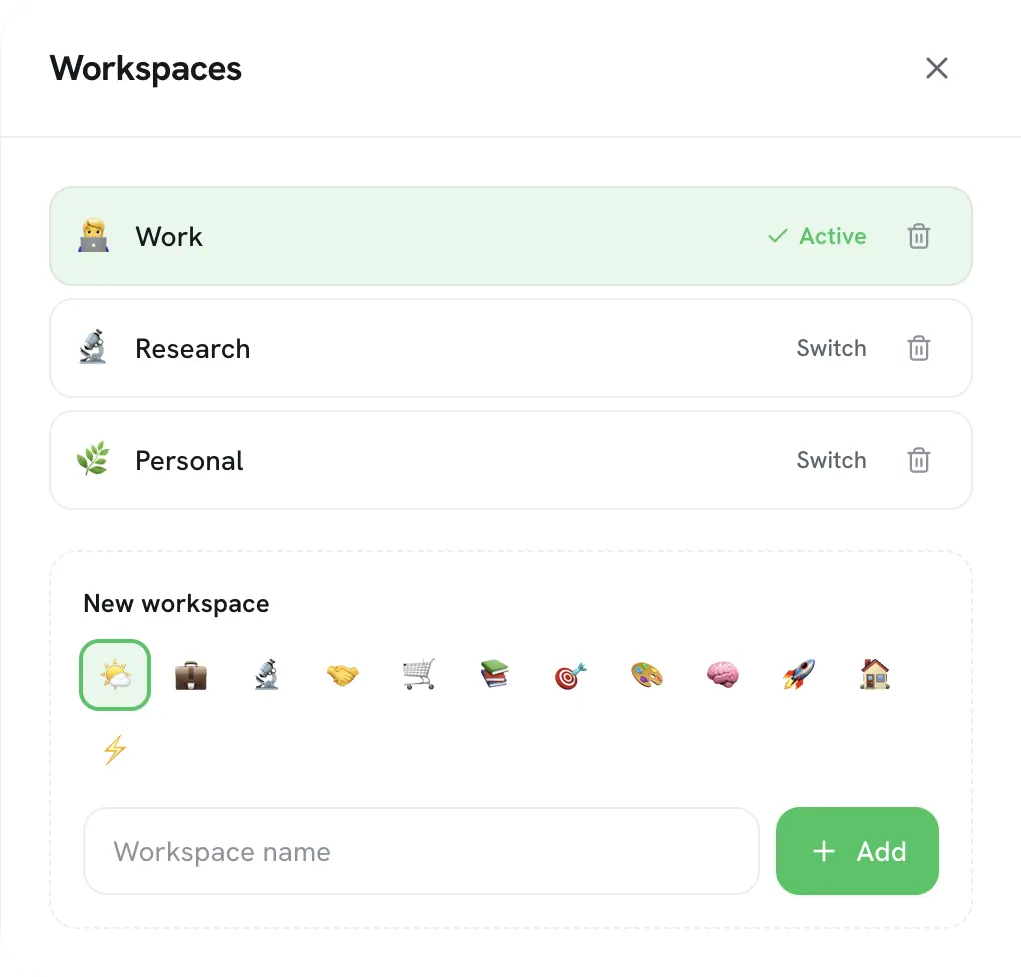
Tabisto replaces the new tab with a visual dashboard of your bookmarks, organized into sections and separate workspaces, plus saved tab sessions, quick notes, reminders, and a command palette. The idea is simple: instead of burying bookmarks in a dropdown you forget exists, it puts them in front of you every time you open a tab.
Strengths. Bookmarks are visible and one click away. Workspaces keep Work and Personal apart. It is local-first, so it loads instantly and works offline, and cloud sync across devices is free rather than paywalled. It imports your existing Chrome bookmarks in one step.
Free tier. 2 workspaces, 25 bookmarks, 1 saved session, 3 reminders, full theming, command palette, notes, and free sync. No account required to start. Pro ($3.99/mo or $35.88/yr) removes the limits.
Where it falls down. It is a bookmark and workspace dashboard, not a focus/affirmation tool. If you mainly want a single daily goal and a photo, Momentum fits that mood better.
Best for: people whose bookmarks are a buried mess and who want them organized and instantly reachable.
2. Momentum: best for a calm, focused start
Momentum shows a full-screen photo, a clock, a weather readout, and a single daily focus prompt. It is less an organizer than a moment of calm and intention when you open a tab.
Strengths. Beautiful by default, genuinely soothing, and the daily-focus prompt is a nice nudge. Great if your goal is to feel less frantic, not to manage links.
Where it falls down. The free version is fairly limited; links, todos, custom photos, and more sit behind Momentum Plus. It is also a place to glance at, not a place to organize from. We go deeper on this in our Momentum alternative page.
Best for: people who want a calm, motivational new tab and do not need heavy organization.
3. Infinity New Tab: best for an all-in-one dashboard
Infinity packs icons, weather, a to-do list, notes, and a wallpaper into one configurable dashboard. It tries to be everything at once.
Strengths. Lots of widgets, lots of customization, and a familiar speed-dial style icon grid. If you like a busy, do-everything home screen, Infinity delivers it.
Where it falls down. It can feel cluttered, some features lean on its cloud and account, and the paid tier gates parts of it. If you want calmer and faster, see our Infinity New Tab alternative comparison.
Best for: people who want a single packed dashboard and do not mind the visual noise.
4. Tabliss: best for a no-account, minimal look
Tabliss is a clean, open-source new tab focused on gorgeous backgrounds, a clock, and a few light widgets. No account, no upsell.
Strengths. Free, privacy-friendly, no sign-in, and the photo and gradient backgrounds are lovely. A great low-commitment pick if you mostly want a beautiful blank slate.
Where it falls down. It is intentionally light on organization. There is no real bookmark management or workspaces, so it will not solve a messy-links problem.
Best for: minimalists who want a pretty, private new tab and keep their bookmarks elsewhere.
5. Speed Dial 2: best for a classic dial grid
Speed Dial 2 is the long-running take on the "dials" new tab: a grid of large site thumbnails you click to jump to your top sites, with groups and sync.
Strengths. Familiar, fast access to your most-visited sites, with grouping and an app launcher. If the dial metaphor is what you want, it is mature and well-known.
Where it falls down. The free tier is limited and some sync and customization sit behind the paid plan, and the dial model is narrower than a full workspace. See our Speed Dial 2 alternative page for the trade-offs.
Best for: people who like a thumbnail dial grid for their top sites.
6. Chrome's default new tab: best for zero install
Do not overlook what you already have. Chrome's built-in new tab shows a search box, your most-visited shortcuts, and an optional background.
Strengths. Nothing to install, syncs with your Google account, and it is fast. For a light user it is genuinely enough.
Where it falls down. It does almost nothing for organization, has no workspaces, notes, or saved sessions, and the shortcuts are auto-chosen rather than yours. Most people who open a lot of tabs outgrow it quickly.
Best for: light users who want zero setup.
Quick comparison
| Extension | Best for | Free tier | Local-first |
|---|---|---|---|
| Tabisto | Organizing bookmarks on every tab | Real, no account | Yes |
| Momentum | Calm, focused start | Limited | Partly |
| Infinity | All-in-one dashboard | Limited | No |
| Tabliss | Minimal, no account | Generous | Yes |
| Speed Dial 2 | Classic dial grid | Limited | No |
| Chrome default | Zero install | Built in | Yes |
How to install and switch
Whichever you pick, the mechanics are the same: install it from the Chrome Web Store and it overrides your new tab automatically. If you want the step-by-step, including how to revert, see our guide on how to change your new tab page in Chrome.
And if the real problem behind your messy new tab is messy bookmarks, start with our walkthrough on organizing bookmarks in Chrome, then import the cleaned-up set into whichever extension you choose.
Frequently asked questions
What is the best Chrome new tab extension?
It depends on your goal. For organizing bookmarks and reaching them from every tab, Tabisto is a strong free pick. For a calm, motivational start, Momentum. For a packed all-in-one dashboard, Infinity. For a minimal no-account look, Tabliss. Match the tool to whether you want to organize, focus, or just enjoy a clean background.
Are new tab extensions free?
Many have real free tiers, but several paywall the basics. Tabisto and Tabliss offer genuinely usable free versions; Momentum, Infinity, and Speed Dial 2 gate more features behind paid plans. Always check what the free tier actually includes before committing.
Do new tab extensions slow down Chrome?
A well-built, local-first one does not, because it loads from your machine and only runs on the new tab page. Extensions that fetch remote photos or run heavy scripts on every open can feel slower. Prefer local-first tools if speed matters to you.
Can I use more than one new tab extension at once?
No. Chrome lets only one extension override the new tab page at a time, and it uses the most recently enabled one. Disable the others at chrome://extensions to pick which wins.
Are new tab extensions safe?
Reputable ones from the Chrome Web Store are, but check permissions before installing. A new tab extension can see how often you open tabs, so favor local-first tools that do not track your links or route data through third-party servers.